> ## Documentation Index
> Fetch the complete documentation index at: https://sequence-0fb8d9e6-api_docs.mintlify.site/llms.txt
> Use this file to discover all available pages before exploring further.
# Checkout Modal
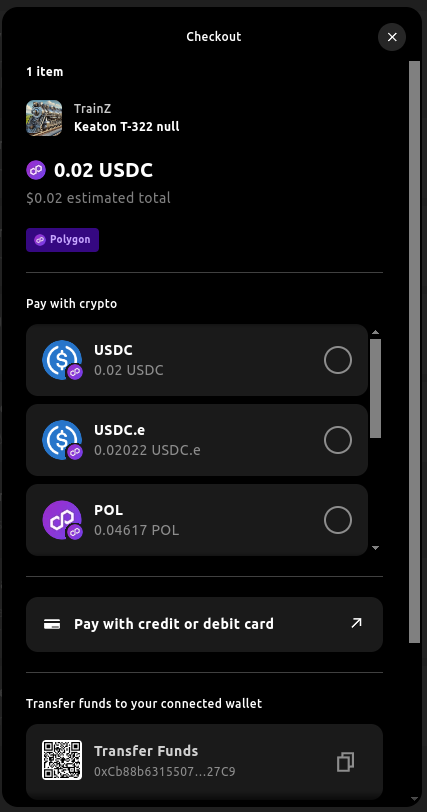
> The Checkout Modal provides developers with an easy way to implement cryptocurrency payments.
Sequence Checkout allows users to easily purchase an ERC721 or ERC1155 token with a primary or secondary sales contract such as a marketplace, with the following payment options:
* Purchase with any cryptocurrency in the wallet.
* Receive funds from another wallet to a Sequence wallet and purchase.
* Pay using a credit or debit card which will intelligently detect the correct provider for each region, chain and currency.
* Pay with another cryptocurrency in a wallet by doing an automated swap and purchase.
We have an integrated checkout flow that you can leverage by installing the dedicated library `@0xsequence/checkout` and using it in conjunction with `@0xsequence/connect`.
In order to enable credit card payments for checkout, please get in touch with the Sequence team as your contract address will need to be allowlisted and go through a KYB process for your organization. Credit card payments only work on various networks mainnets
# Installation and Setup
To integrate the checkout feature, follow these steps:
```bash theme={null}
npm install @0xsequence/checkout
# or
pnpm install @0xsequence/checkout
# or
yarn add @0xsequence/checkout
```
```jsx theme={null}
import { SequenceCheckoutProvider } from '@0xsequence/checkout'
import { SequenceConnect } from '@0xsequence/connect'
import { config } from './config'
const App = () => {
return (
)
}
```
Now we have the setup done, let's see how to use the checkout modal for different use cases.
## Custom Contract
We instantiate the `useSelectPaymentModal` hook to open the checkout modal and pass a settings object. In addition, for custom contracts, you can specify a contract ABI along with encoding the call data, in this case we are using `ethers` and `viem`'s `encodeFunctionData` utility.
```tsx theme={null}
import { useAccount } from 'wagmi'
import { useSelectPaymentModal, type SelectPaymentSettings } from '@0xsequence/checkout'
import { toHex } from 'viem'
import { encodeFunctionData } from 'viem'
const MyComponent = () => {
const { address } = useAccount()
const { openSelectPaymentModal } = useSelectPaymentModal()
const onClick = () => {
if (!address) {
return
}
const currencyAddress = '0x3c499c542cEF5E3811e1192ce70d8cC03d5c3359'
const salesContractAddress = '0xe65b75eb7c58ffc0bf0e671d64d0e1c6cd0d3e5b'
const collectionAddress = '0xdeb398f41ccd290ee5114df7e498cf04fac916cb'
const price = '20000'
const chainId = 137
const erc1155SalesContractAbi = [
{
type: 'function',
name: 'mint',
inputs: [
{ name: 'to', type: 'address', internalType: 'address' },
{ name: 'tokenIds', type: 'uint256[]', internalType: 'uint256[]' },
{ name: 'amounts', type: 'uint256[]', internalType: 'uint256[]' },
{ name: 'data', type: 'bytes', internalType: 'bytes' },
{ name: 'expectedPaymentToken', type: 'address', internalType: 'address' },
{ name: 'maxTotal', type: 'uint256', internalType: 'uint256' },
{ name: 'proof', type: 'bytes32[]', internalType: 'bytes32[]' }
],
outputs: [],
stateMutability: 'payable'
}
]
const collectibles = [
{
tokenId: '1',
quantity: '1'
}
]
const purchaseTransactionData = encodeFunctionData({
abi: erc1155SalesContractAbi,
functionName: 'mint',
args: [
address,
collectibles.map(c => BigInt(c.tokenId)),
collectibles.map(c => BigInt(c.quantity)),
toHex(0),
currencyAddress,
price,
[toHex(0, { size: 32 })]
]
})
const selectPaymentModalSettings: SelectPaymentSettings = {
collectibles: [
{
tokenId: '1',
quantity: '1'
}
],
chain: chainId,
price,
targetContractAddress: salesContractAddress,
recipientAddress: address,
currencyAddress,
collectionAddress,
creditCardProviders: ['transak'],
copyrightText: 'ⓒ2024 Sequence',
onSuccess: (txnHash: string) => {
console.log('success!', txnHash)
},
onError: (error: Error) => {
console.error(error)
},
txData: purchaseTransactionData,
}
openSelectPaymentModal(selectPaymentModalSettings)
}
return
}
```
Congratulations! You’ve just learned how to use the Checkout Modal with Web SDK.